Saturday, April 3, 2021

Chapter 1: Introduction to Computer Programming

We uses computer everyday and they come in different shape and sizes. The following video introduces what a computer do.


After watching the above video, can you name a few devices that is also a computer?


Typical computers has input and output. 

Input are data/information provided to a computer, typically they are 

    - Keyboard


- Mouse


After reading the input provided, the computer generate Output, typically they are shown in 

    - Display


But there are also other smaller computers, can you name the input and output of the following devices:

1) Mobile devices such as iPad, mobile phones

2) Washing Machine

3) TV


Did you notice that with input, the computer is smart enough to generate a corresponding output? Programming allows a computer to generate these input and this course will teach you how they are generated.

Thursday, September 12, 2019

Quick help on Writing C Extension for Python

Here are a few links to the website which I think is helpful in doing this:

The below 3 link will help you understand the basic of building from window:

https://docs.python.org/3/extending/extending.html
https://docs.python.org/3/c-api/module.html#c.PyModuleDef
https://stackabuse.com/enhancing-python-with-custom-c-extensions/
https://stackoverflow.com/questions/49299905/error-lnk2001-unresolved-external-symbol-pyinit
https://docs.python.org/3/c-api/structures.html

After which, the challenge is to compile/link it to the Python project. The challenge I have is when compiling the code, you cannot just use a typical compiler from the IDE. Rather I found out that you have to use the relevant command prompt:
https://docs.python.org/3/extending/windows.html
https://docs.microsoft.com/en-us/cpp/build/how-to-enable-a-64-bit-visual-cpp-toolset-on-the-command-line?view=vs-2019

For example:

cl /LD /I <Path to Python36/inclulde> spammodule1.c <path to python36.lib>
e.g.
cl /LD /I C:\Users\username\AppData\Local\Programs\Python\Python36\include\  spammodule1.c C:\Users\username\AppData\Local\Programs\Python\Python36\libs\python36.lib


At this point, I got stucked because I am not able to proceed to how to use the DLL and LIB files.

However, I found out that you can also use the distutils method to compile into .py files:
https://docs.python.org/3/extending/building.html

For example:
<Python.exe path> setup.py build
C:\Users\username\AppData\Local\Programs\Python\Python36\python.exe setup.py build

I find this method easier as it will do compilation as well as typical installation that allow you to use it like any other Python Module. Do note however that you need to include the path into the Python Interface:

https://stackoverflow.com/questions/28326362/pycharm-and-pythonpath


Saturday, August 24, 2019

Analysing Turf Club Data - Age does matter

In the past few weeks, I have been exploring data science and having read about Bill Benter I decided to also explore Data published on Turf Club. I managed to scrape the Singapore Turf Club and pull ut the following data:

Horse Performance
Jockey Performance
Race information

The pulling of information was relatively easy but I spend a lot of time cleaning up the data. The following are some record of what I found.

Horse Age
My initial thoughts were that horse age would matter since intuitively, the older any organism gets, the less likely it will be as strong. But it turn out that horse age does not matter. This means a old horse may still win a younger ones. This may make sense because I imagine myself to be a horse owner and I would also want to optimize the capability of my horse. This means I will not take part in competition that I have no chance of winning.


Jockey
I notice that for some horses, the same Jockey gets to ride them while other horses, the Jockey keeps changing. Some jockey has higher winning percentage while others are lower than average.

Age - Hypothesis 1
Horse age has an impact to winning.
I do not see a significant change in distribution for winners vs losers vs all population. If anything it shows that owners are less likely to send old horses for competition.


Even for old horses, the winning (1st or 2nd) rate is about 14% and that is just 1+% off the fair winning rate of 16+% (1/12*2). So it is fair to say every horse has an equal winning rate.

The best way of doing this is of course to conduct an hypothesis test but I did not go any further since I also believe surface information will not get me any extra information.


First time riding - Hypothesis 2

In this hypothesis, I think it matter if the jockey is riding the horse the first time. He may not have established a good understanding of the horse and this may affect the chance. So here we did some analysis:

Overall Analysis:

My finding is that young horses react very well to new ridership. Total probability of any horse winning (1st or 2nd) for all age is generally high at 25%:


Specifically, for age less than 1500 years is higher at 30%:


For older horses, there is no advantage in terms of probability:

Nth riding - Hypothesis 3
What about riding after once or twice or Nth time? Many a times I realized a horse is being rode by the same Jockey for an extended period of time. Is there an advantage to using the same Jockey?

It is found that older horses generally do not perform well to repeatedly being rode by the same Jockey:


Saturday, May 26, 2018

How to use Python in Excel

Here is a simple way to use Python in Excel which most would like since Python is a very quick and easy way to get things done.

Pre-requisite:

MS Excel
Excel Python
Windows extension for python

There are many tutorial which guides you to how this can be done. Please refer to the link in the reference.

After installation, you may encounter a bunch of issues, please refer to the troubleshooting page, I managed resolve everything from information found in this page.

You will see the Excel Python Tab available in Excel:


There are only 2 buttons:

1) Setup ExcelPython: Gets you started by creating a Python file and link it to your current workbook
2) Import Python UDF: Extract Python functions you created to Excel so you can use them directly without writing any VBA.

Click the first button to setup things. You will find a <worksheetfilename>.py file created in the same folder. What you have to do is to code functions in that Python file. E.g.

Workbook name: //path/Book1.xlsm
Associated Python file: //path/Book1.py

Next,click on the 2nd button to import the functions you have written and you are done!
Now you just need to use the same function name to execute your python functions.

Please find the attached example here.

Reference:
https://github.com/ericremoreynolds/excelpython/blob/master/docs/tutorials/Addin01.md

Friday, May 26, 2017

FE Trivial Part 1 - Relationship between Caplet and Option on Zero Coupon Bond

Caplet Payoff:

$X_{t_i}= N.\tau_i.Max(0,L(t_{i-1},t_i)-K)$

Given that forward rate:

$\tau_i.L(T_{i-1},T_i) = \frac{1-P(T_{i-1},T_i)}{P(T_{i-1},T_i)}$

Caplet Payoff:
$X_{t_i}$
$= N.\tau_i.Max(0,L(T_{i-1},T_i)-K)$
$=N.Max(0,\tau_i.L(T_{i-1},T_i)-K.\tau_i)$
$=N.Max(0,\frac{1-P(T_{i-1},T_i)}{P(T_{i-1},T_i)}-K.\tau_i)$

Discounting to today:
Caplet Price:
$= P(T_{i-1},T_i).N.Max(0,\frac{1-P(T_{i-1},T_i)}{P(T_{i-1},T_i)}-K.\tau_i)$
$= N.Max(0,1-(P(T_{i-1},T_i))(1+K.\tau_i))$
$= (1+K.\tau_i).N.Max(0,\frac{1}{(1+K.\tau_i)} - P(T_{i-1},T_i))$
$= N_{zero}.Max(0,K_{zero} -S_{zero})$

This the pricing of a put option on a Zero Coupon Bond with

Notional: $= (1+K.\tau_i).N$
Strike:$=\frac{1}{(1+K.\tau_i)}$

This will be important when we compare with Hull White 1 Factor Zero Coupon Bond Put European Option. Under the Hull White 1 Factor model, the close form solution is:

$Put_{zero} (t_0,t_1,t_2,K_{zero}) = K_{zero}P(t_0,t_1)\phi(-h+\sigma_{zero})-P(t_0,t_2)\phi(-h)$

Where
$\sigma_{zero}= \sigma_{black}\sqrt{\frac{1-e^{-2a(t_1-t_0)}}{2a}}B(t_1,t_2)$
$h=\frac{1}{\sigma_{zero}}ln{\frac{P(t-0,t_2)}{P(t_0,t_2)K_{zero}}+\frac{\sigma_{zero}}{2}}$

source


Wednesday, February 22, 2017

xVA


This article is to document what I have learned about XVA. I will first layout a few idea and continue to improve this as I find out more. Source of these information are from books such as

1 ) The XVA Challenge
...

For an introduction, the point of calculating XVA is to find out the various cost of transaction in banks, from inception to maturity. Various stakeholders are involved in this process:

1) Dealers
a. Traders
There are different kind of traders in a bank, some are just doing flow business, others are doing proprietary trading. Typically, the head of desk will treat the desk trading business as any other business. He/She will consider the cost of operating this desk. XVA will form part of the operation cost.
b. Structurers
The trades done by structures are huge chunky trades as compared to traders. These are typically longer term as well. The counterparties involved are typically entities such as fund house, security firms and corporates. These counterparties have significant credit risk compared to interbanks trades. Therefore, XVA will form an important cost to the desk.

2) CVA Desk
This desk is responsible for hedging the CVA (one part of XVA) which is directly linked to the credit risk of counterparties. Hedges are typically done using CDS or proxy trades which is correlated to counterparties. Traders and Structurer will pay CVA cost to this desk and as such the credit risk associated with the trade is taken to be hedged out with this desk. This desk will be interested in the CVA Greeks as they are required to managed the CVA according to the movement in the market.

3) Risk Managers
This function is involved in computing, monitoring and reporting the exposure of the bank to management and regulators.


XVA Components

CVA
Simpliest among these, just go Google

DVA
The flip side of CVA.

FVA


KVA

For every trade done in bank, there is a capital charge associate with it. These charges are amount which banks are required to set aside for mitigating counterparty credit risk. In the past, banks ignore this cost and uses quick and dirty way such as using minimum charges to transactions. Today, banks have became more sophisticated and implements KVA is to properly price the cost of setting aside such Capital for regulatory purposes.

3 factors to Capital Requirement for OTC Derivatives
- Default risk capital charge
Potential default charge of counterparty i.e. CCR

- CVA capital Charge
CVA sensitivity due to movement in Credit Spread

- Market Risk Capital Charge (insignificant since regulator has implement rule to reduce this)
These are capital charges arises from doing hedges.

- Capital Charge on exposure to CCP is very little.

Formula
KVA  =-$\sum_{i=1}^{m} $EC(t_i)xCC(t_i)X(t_i-t_(i-1))XS(t_i)

Margin Valuation Adjustment (MVA)
As the name suggest, this adjustment is related to margin associated with trades. Margin are charged to protect against default, so it is expensive and not re-hypothecated; it is regarded as a separate amount.

It consist of:
1) Initial Margin (and other financial resources required by Central Counterparty (CCP)
When a bank (Clearing Member) deal with counterparty via CCP, they are required to post an Initial Margin (IM) so that if they default, this margin can help buffer against the lost suffered by CCP.
These are cost to banks as the interest paid by CCP are less than the funding cost required.

Questions:
What benchmark is used by CCP to pay clearing members for IM?

2) Bilateral IM
This is required when both parties are required to post initial margin to each other.

3) Contingent IM

How are IM calculated?
IM calculation are determined by using VAR or expected shortfall. This means they need to specify % confidence interval and time horizon.

MVA  =-$\sum_{i=1}^{m} $EIM(t_i)x(FC(t_i)-S_im)X(t_i-t_(i-1))XS(t_i)

Where $EIM = discounted expected IM, $FC is funding cost and $S_IM is the remuneration from posting IM.

EIM are calculated using simulation over 99% confidence interval with 10 days horizon.

Comparison with FCA
- MVA is the funding cost associated with worst-case movement of portfolio during a 10 day horizon. This is due to the fact that the trade is collateralized and the 10 days is to cover the situation where there is a default discovered only after 10 days, by which the market would have moved.

-FCA is the funding requirement over the life of the trade.

Questions:
What is the flow of calculating MVA?


XVA consists of a few components summarized in the table below:

ColVA
CVA
DVA
FVA
KVA
MVA
Uncollateralised
One-way collateralised
()
()
Traditional two-way collateralised
()
()
Single-currency two-way collateralised
()
()
()
Collateralised with bilateral initial margin
()
()
Centrally cleared (direct)
()
()
Centrally cleared (indirect)
()
()
Obtained from the book: The XVA Challenge


Sunday, May 29, 2016

Using C# in Excel Part I


In the typical work environment, it is very common for non-programmer to try to use VBA to create process automation. And it is no doubt a fast way to implement automation with the least computing knowledge. However, when the complexity is high and coupled with high volume, this will significantly slow down the PC and creates bad user experience. Especially when we are doing it for another user, we might wonder if there is a better solution?

In this post, I explore how I can use C# to code automation functions and to implement it onto VBA. This is nothing new so all the information required was obtained from other experts online. Specifically, I got most of the information here.

Step 1:
Using Visual Studio Community 2015, create a class library:


Step 2:
Communication with VBA require the code to be in "COM Library", so to do this
a)  You have to check "Make Assembly COM-Visible" checkbox under 
Project -> Properties -> Assembly Information


b) Next, we will need to register it so that VBA will be able to recognize this when we start coding in VBA. But you also won't want to register all the library you developed on the developing machine as it will make your PC very messy. So I will come back to this setting again later to explain how to remove it. 

Under the same property window, go to the build tab, Project -> Properties -> Build.
Check the ‘Register for COM interop’ checkbox.


Step 3:
The setup is completed and you can start writing your code. The following is a simple code to output a string:

using System;
using System.Collections.Generic;
using System.Text;
 
namespace DotNetLibrary
{
    public class DotNetClass
    {
        public string DotNetMethod(string input)
        {
            return "Hello " + input;
        }
    }
}

Step 4:
Compile and start using in VBA! For example, we now try to use Excel to call the above method.
In Excel, enter the VBA programming window by pressing ALT+F11. You will find that library you created under Tools -> Reference. In this case, the library is called blog.


To access the DotNetMethod, you can invoke by using the following VBA Code:

 
Sub test()
    Dim clest As New DotNetClass
    Dim test As Variant  
    MsgBox (clest.DotNetMethod("ABC"))
 
End Sub

Run the macro ("F5") and you will see the msgbox:


Step 5:
Up till now, what you have seen how to get to use functions in VBA in your own PC. But suppose you want to develop it on your own PC and implement it onto another PC, how can you do it?
So starting from Step 2b, we don't really need to check the "Register for COM Interop" because what we really need is just the DLL file. But now that we checked it, how can we remove it? This is simple, we just need to uncheck and compile your project again and it will be unregistered.

So once you unregistered, whatever you compile will not appear on VBA Reference. You will need to take the DLL and copy to the target PC and start the registration manually.

Register:
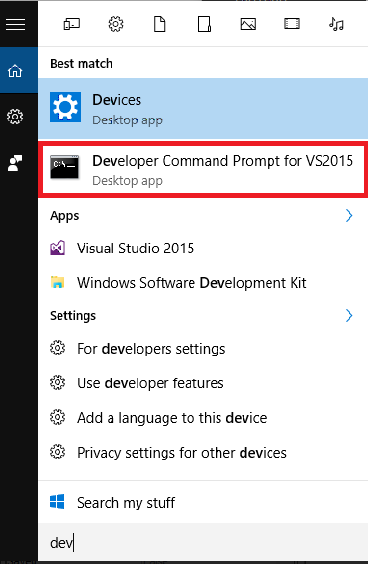
To register you will need to use "regasm" function from Visual Basic Command Prompt. You can easily access this by typing "Dev" after pressing the "Window" key:


Navigate to your project directory containing the DLL file and now you are ready to use the "regasm" function (assuming the name of your dll is "dllname"). Type the following to create the ".tlb" required for VBA to recognize your DLL file.

regasm /tlb  dllname.dll

After typing the above command, you will see that the library will appear in the same place mentioned in Step 4,


If you want to unregister, you can type the following command:

regasm /u dllname.dll

As you can see, all these registering are not very transparent to the developer on what exactly is happening. So there will be times where you are not able to unregistering. And when that happens, a quick way is to open your project and repeat what is mentioned at the beginning for Step 5, i.e. check option -> compile, uncheck option -> compile. This will let Visual Studio do the unregistering for you.


If you want a quick start, you can use the sample project here. Enjoy coding!